French Number Words Color by Code Clipart | French Numbers 1–10

$4.50 (1)

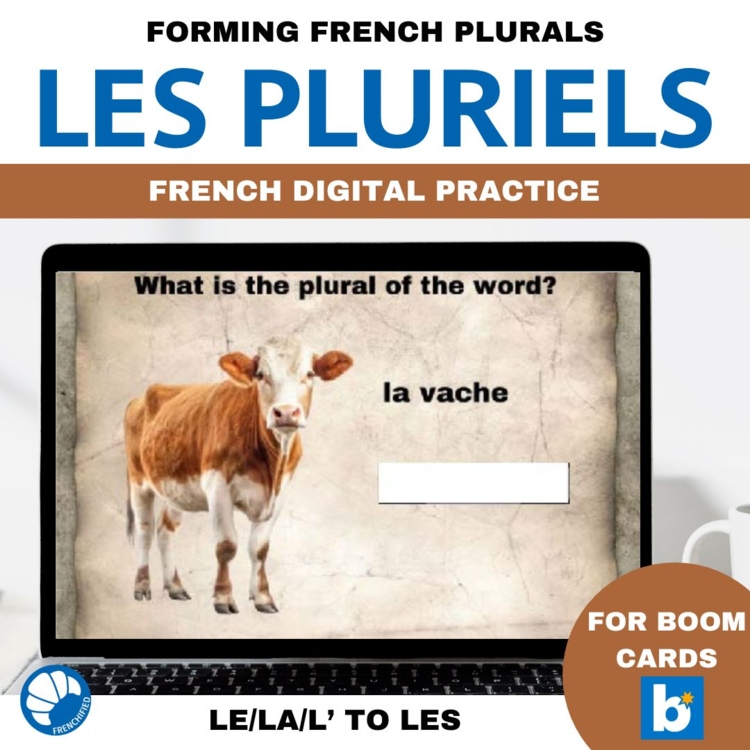
This set of French Boom cards digital task cards practices recognizing and forming the French plurals of nouns using les. All cards are self-grading and will give students feedback on their responses.
Cards 2-5 have an explanation about how most nouns are made plural, with the le/la/l' changing to les and an S being added to the noun.
Card 6 has students sorting words into the correct pile - singular and plural
-Cards 7-19 have students changing a singular noun into the plural form
Card 20 has an explanation about nouns ending in al, eu, and au - which get an x to make the plural.
Cards 21-28 has students forming the plural of nouns ending in al/eu/au.
Cards 29-33 has students listening to an audio of a word and choosing whether they heard the singular or plural form of the noun.
To view the preview of the deck, please visit:
https://wow.boomlearning.com/deck/q-edhYKLW5F8rD2NbrX?ref=tpt
With a Boom learning account, you will be able to track student movement through the deck, as well as data such as time spent on the deck, high score, average score, and which questions students have missed.
To use Boom Cards, you must be connected to the Internet. Boom Cards play on modern browsers (Chrome, Safari, Firefox, and Edge). Apps are available for modern Android, iPads, iPhones, and Kindle Fires. For security and privacy, adults must have a Boom Learning account to use and assign Boom Cards. You will be able to assign the Boom Cards you are buying with "Fast Pins," (a form of play that gives instant feedback to students for self-grading Boom Cards). For assignment options that report student progress back to you, you will need to purchase a premium account. If you are new to Boom Learning, you will be offered a free trial of our premium account. Read here for details: http://bit.ly/BoomTrial.
Did you know that you can earn credit towards your next TPT purchase?
Just leave a review for the products you've purchased and TPT will add the credit to your account!
1. Go to your "My purchases" page.
2. Click the "Leave a review" button under each resource.
3. Answer the questions and leave a review for the resource. Click done.
That's it!
Report this resource to Linked Through Learning
Reported resources will be reviewed by our team. Report this resource to let us know if this resource breaks our rules.
No questions yet.

Meet the Seller
I have been happily married for 31 years, with three adult children who are currently in college. I'm a language, travel and music person. Languages studied: French, Russian, Spanish, Polish, German, Serbo-Croatian, Italian. Instruments I've dabbled in: Clarinet, cello, flute, oboe, bassoon, saxophone, trumpet, piano, viola da gamba, bagpipes. Countries I've visited: Canada, Mexico, Ireland, England, Poland, Slovakia, Germany, Italy, France, Austria, Netherlands.
Arizona
AI Assisted
I develop the ideas, plan the activities, and guide the creation of all resources. AI tools assist with writing, illustrations, and design. Every resource is reviewed, edited, and refined using my teaching experience to ensure quality, accuracy, and meaningful real-world learning.
$6.38 $7.98

AI Assisted
I develop the ideas, plan the activities, and guide the creation of all resources. AI tools assist with writing, illustrations, and design. Every resource is reviewed, edited, and refined using my teaching experience to ensure quality, accuracy, and meaningful real-world learning.
$7.60 $9.50

AI Assisted
I develop the ideas, plan the activities, and guide the creation of all resources. AI tools assist with writing, illustrations, and design. Every resource is reviewed, edited, and refined using my teaching experience to ensure quality, accuracy, and meaningful real-world learning.
$5.60 $7.00
AI Assisted
I develop the ideas, plan the activities, and guide the creation of all resources. AI tools assist with writing, illustrations, and design. Every resource is reviewed, edited, and refined using my teaching experience to ensure quality, accuracy, and meaningful real-world learning.
$5.60 $7.00

AI Assisted
I develop the ideas, plan the activities, and guide the creation of all resources. AI tools assist with writing, illustrations, and design. Every resource is reviewed, edited, and refined using my teaching experience to ensure quality, accuracy, and meaningful real-world learning.
$6.56 $8.20

AI Assisted
I develop the ideas, plan the activities, and guide the creation of all resources. AI tools assist with writing, illustrations, and design. Every resource is reviewed, edited, and refined using my teaching experience to ensure quality, accuracy, and meaningful real-world learning.
$7.60 $9.50