Mystery Mix Clipart Variety Bundle #3 {Creating4 the Classroom}
$18.50 $31.75 (91)

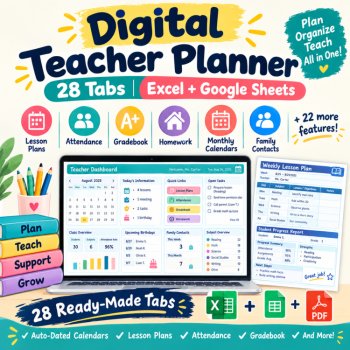
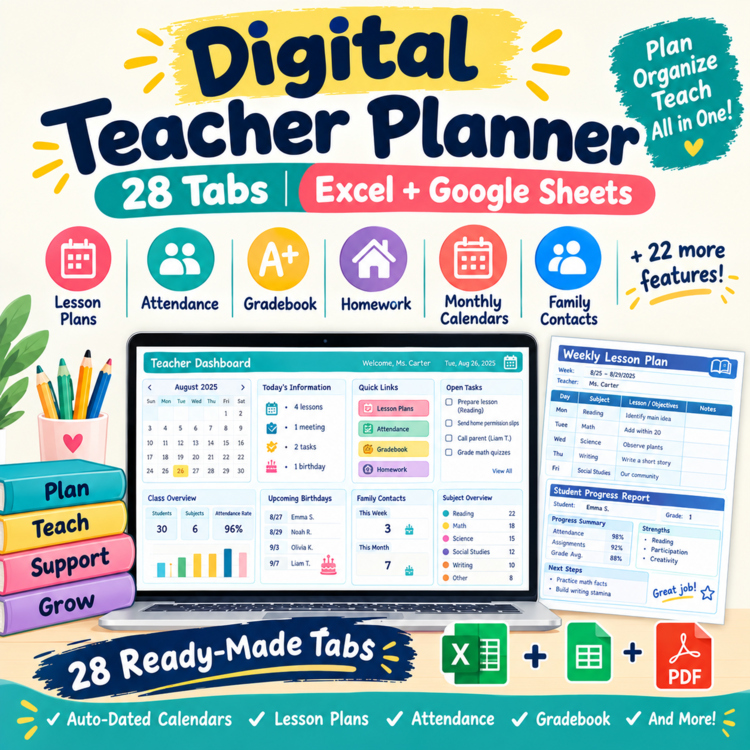
Digital Teacher Planner | 28 Tabs, Auto-Dated Calendars, Lesson Plans, Attendance & Gradebook
Lesson Plans • Daily Attendance • Gradebook • Homework • Monthly Calendars • Family Contacts — 28 connected tabs in one editable digital planner
Take your everyday teacher organization out of separate notebooks, spreadsheets, and calendars and bring it together in one easy-to-use planner.
Set your school year start date once, then use the built-in schedules and monthly calendars to organize your teaching year. Record attendance, plan lessons, enter grades, manage homework, keep family contact notes, organize field trips, and track your personal to-do list.
The planner is designed for practical daily use, with light-yellow input cells, dropdown menus, automatic calculations, connected class information, and protected formulas.
📅 What's Included: 28 Ready-Made Tabs 1. Setup
Enter your:
Your subject list feeds the appropriate dropdown menus throughout the planner.
2. Dashboard
Get a quick overview of your school year, including:
3. Roster
Organize up to 30 students across 3 class blocks.
Track:
4. Student Info
Keep additional information organized for each student in one convenient grid.
5. Birthdays
Automatically organize student birthdays so you can quickly see upcoming birthdays throughout the school year.
6. Contacts
Record family communication with:
7. Schedule
Create your weekly teaching schedule with dates generated from your school-year setup.
8. Lesson Planner
Plan lessons by week and class block.
Use subject dropdowns and organized planning fields to keep your weekly instruction in one place.
9. Attendance
Record daily attendance using:
P / T / U / E / O
The tracker automatically calculates attendance totals and percentages.
10. Gradebook
Record assignment grades for your students and let the workbook calculate averages automatically.
11. Homework
Track:
12. Assignment Calendar
View homework and assignments in an organized calendar-style layout.
13. Field Trips
Record:
14. To-Do
Keep your personal teacher tasks organized with:
Use High / Medium / Low priority options.
15. Notes & Meetings
Record:
16–27. January–December Calendars
Includes 12 monthly calendars that automatically generate dates based on the school-year start date entered in Setup.
Use them for:
28. How to Use / My Info
Quick-start instructions plus a dedicated area for your teacher information.
⚙️ Built for Everyday Teacher Use Auto-Dated Calendars
Enter your school-year start date once and the planner automatically updates its date-based sections.
Dropdown Menus
Use dropdowns for subjects, attendance codes, priorities, statuses, and other recurring fields.
Connected Information
Your class and subject information feeds into relevant sections, reducing repetitive typing.
Automatic Calculations
Let the workbook handle calculations such as:
Protected Formulas
Formula cells and important layout areas are protected to help prevent accidental changes.
Clear Input Areas
Light-yellow cells indicate areas where you enter information.
👩🏫 Perfect For
This digital teacher planner is useful for:
💻 Excel + Google Sheets Excel
Use the complete editable workbook in Microsoft Excel.
Google Sheets
A Google Sheets version is also available for teachers who prefer browser-based planning.
Important: Make your own copy of the Google Sheets file before entering personal or classroom information.
📦 Files Included
✔ Digital Teacher Planner Excel workbook
✔ 28 ready-made tabs
✔ 12 monthly calendars
✔ Auto-dated school-year sections
✔ Lesson planning pages
✔ Attendance tracker
✔ Gradebook
✔ Homework tracker
✔ Assignment calendar
✔ Family contact log
✔ Field-trip tracker
✔ To-do list
✔ Notes & meeting log
✔ Student roster
✔ Student information pages
✔ Dashboard
✔ Dropdown menus
✔ Automatic calculations
✔ Protected formulas
✔ Sample data for demonstration
✔ Google Sheets version/access
⭐ Why Use One Planner?
Instead of keeping separate files for:
Planning + Attendance + Grades + Homework + Calendar + Contacts + Tasks
keep your everyday teacher organization together in one connected digital workbook.
Set up your class once, enter your school-year date, and then use the planner throughout the year.
Important Information
by Koco Kyo | Practical digital resources for organized teaching.
Report this resource to Linked Through Learning
Reported resources will be reviewed by our team. Report this resource to let us know if this resource breaks our rules.
No questions yet.

Meet the Seller
Learn. Play. Create. Educational Games, Interactive Activities & Teacher Trackers
Koco Kyo creates engaging educational games, interactive digital activities, printable worksheets, and practical classroom trackers that make learning more engaging and help teachers organize student progress. Explore phonics and literacy games, math activities, skill-building resources, and easy-to-use Excel and Google Sheets trackers designed for classroom practice, learning centers, intervention, and independent learning. From playful games to practical teaching tools, Koco Kyo helps teachers bring learning to life.
DZ
$18.50 $31.75 (91)
$24.50 $33.50 (69)