
Description
Literacy centers, math stations, independent practice, and early-finisher activities, all in one easy-to-use file.
Finding activities for different learning needs takes time. Keeping students engaged while you work with small groups can be challenging. And when students practice independently, you still need a way to see which skills they understand and which need more practice.
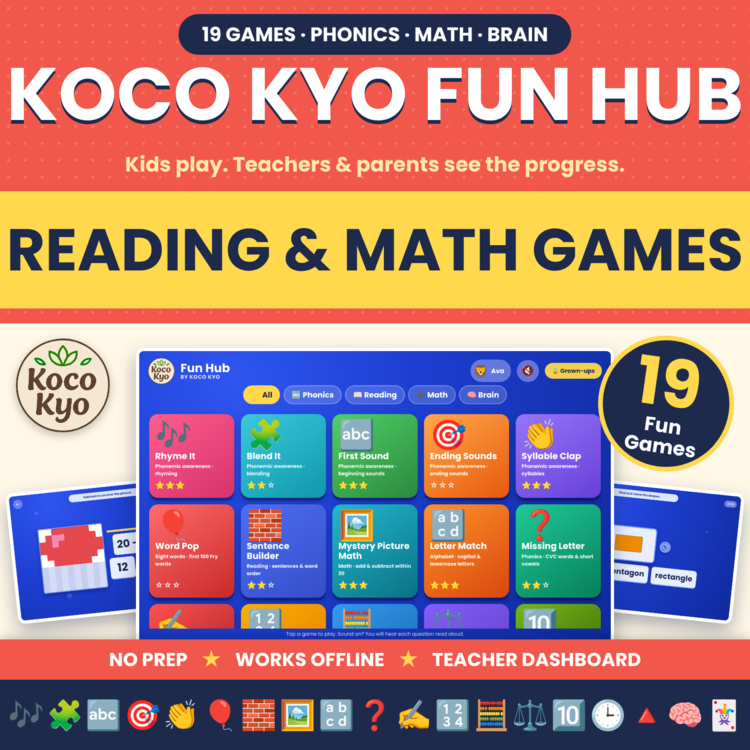
Koco Kyo Fun Hub brings 19 educational games and a Teacher & Parent Dashboard together in one downloadable HTML file.
Students can practice phonics, reading, spelling, early math, and memory skills through interactive games. You can review their results, identify areas for additional practice, and print or export progress reports.
Open the file in a supported browser and start playing. No sign-up, no advertisements, and no internet connection required after download.
WHAT YOUR STUDENTS WILL PLAY Phonics & Phonemic Awareness
Help students practice the building blocks of reading through listening,
matching, and word activities.
Rhyme It: Find the picture that rhymes.
Blend It: Put word parts together to make words.
First Sound: Identify the beginning sound in a word.
Ending Sounds: Match words by their ending sounds.
Syllable Clap: Count the syllables in words.
Letter Match: Match uppercase and lowercase letters.
Missing Letter: Complete CVC words and practice short vowels.
Reading & Sight Words
Give students extra practice with word recognition, spelling, and sentence structure.
Word Pop: Find and pop the balloon with the Fry sight word you hear. Includes the first 100 Fry sight words.
Sentence Builder: Listen to a sentence and tap the words in the correct order. Includes three levels.
Spell It: Build words one letter at a time.
Math
Reinforce number sense, computation, and early mathematical concepts.
Mystery Picture Math: Solve addition and subtraction problems within 20 to reveal one of 100 hidden pictures.
Count It: Count objects up to 20.
Number Bonds: Practice making 10 and 20.
Greater or Less: Compare numbers.
Tens & Ones: Read place-value blocks.
Telling Time: Read analog clocks to the hour and half hour.
Shape Detective: Identify and find 2D shapes.
Brain Builders
Help students develop attention, visual memory, and pattern recognition.
Pattern Pals: Determine what comes next in a pattern.
Memory Match: Find matching pairs.
FEATURES THAT MAKE INDEPENDENT PRACTICE EASIER
Read-aloud questions: Students can listen to questions and prompts instead of relying on reading alone.
Two built-in voice options: The included audio works without an internet connection.
Helpful hints: A visual hint appears after two incorrect attempts.
Rewards and feedback: Stars, confetti, and sounds respond to student play.
Multiple players: Several students can take turns on the same device, with separate progress records.
Simple navigation: Category tabs for Phonics, Reading, Math, and Brain make it easy to select an activity.
TEACHER & PARENT DASHBOARD
Keep track of student practice without maintaining separate records for every game.
The dashboard is protected by a grown-up question and includes:
Class heat map: Review each player's first-try accuracy across the games.
Individual progress reports: View Strong, Growing, and Needs Practice categories, time played, progress trends, and frequently missed questions.
Printable reports: Print student reports for parent conferences, intervention meetings, or your own records.
CSV export: Export progress data for recordkeeping or use with a spreadsheet.
Local progress storage: Progress is saved in the browser on the device being used. The game requires no accounts and does not send student data anywhere.
Use these results to identify skills that may benefit from further practice. Game results are practice indicators, not a substitute for formal assessments.
USE IT FOR
Literacy centers and reading rotations
Math stations
Morning work
Early finishers
Small-group intervention
Independent computer time
Substitute plans
Computer labs
Homework and home practice
Homeschool activities
Summer learning
SKILLS PRACTICED
Rhyming, syllables, beginning and ending sounds, blending, letter recognition, CVC words, spelling, sight words, sentence structure, counting, addition and subtraction within 20, number bonds, comparing numbers, place value, telling time, 2D shapes, patterns, and visual memory.
The activities provide practice with foundational skills associated with standards including CCSS RF.K.1, RF.K.2, RF.K.3, RF.1.3, K.OA, 1.OA.C.6, 1.NBT, 1.MD.B.3, and K.G.A.2.
WHAT YOU GET
One HTML file: All 19 games, the Teacher & Parent Dashboard, and two built-in voice options. File size is approximately 14 MB.
One PDF: Thank-you and preview PDF with quick-start instructions.
TECHNICAL DETAILS
Compatible browsers: Chrome, Safari, Edge, and Firefox.
Offline use: Download and save the HTML file to your device, then open it in a supported browser.
iPad and Chromebook: Save the file to Files or Drive first, then open it using a compatible browser.
Audio options: The two built-in voice options work offline. A third option uses your device's text-to-speech feature. Sound can be turned off.
Progress: Records are stored in the browser on the device used. For consistent tracking, use the same device and browser each time.
Backups: Clearing browser data can erase saved progress. Export a CSV when you want to keep a backup.
Format: This is a downloadable HTML file, not an Easel or Google Slides activity.
HELP YOUR STUDENTS PRACTICE WITH PURPOSE
Give students a variety of activities to work through while you teach small groups, prepare lessons, or support individual learners. Use the dashboard to review their results and decide what to practice next.
Questions? Please contact me through the product page. I'm happy to help.
Explore more educational games, trackers, and pintable's from Koco Kyo:
License: One teacher and one classroom, or one family. Additional teachers must purchase their own licenses. Do not post the file online or upload it to a learning platform.
Report this resource to Linked Through Learning
Reported resources will be reviewed by our team. Report this resource to let us know if this resource breaks our rules.
Questions & Answers
Sign in to ask a questionNo questions yet.

Meet the Seller
Learn. Play. Create. Educational Games, Interactive Activities & Teacher Trackers
Koco Kyo creates engaging educational games, interactive digital activities, printable worksheets, and practical classroom trackers that make learning more engaging and help teachers organize student progress. Explore phonics and literacy games, math activities, skill-building resources, and easy-to-use Excel and Google Sheets trackers designed for classroom practice, learning centers, intervention, and independent learning. From playful games to practical teaching tools, Koco Kyo helps teachers bring learning to life.
DZ
- 0Followers