Alphabet Clipart Bundle |Beginning Sounds Clipart

$45.50 $89.50 (354)

Twenty minutes left of Friday, the unit test is Monday, and the kids have heard your summary of the chapter four times already. The version that sticks is the one where they argue about it in teams - and the thing standing between you and that game is twenty minutes of typing questions into a template.
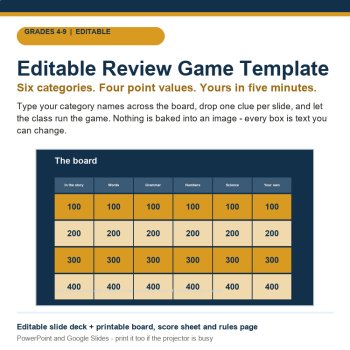
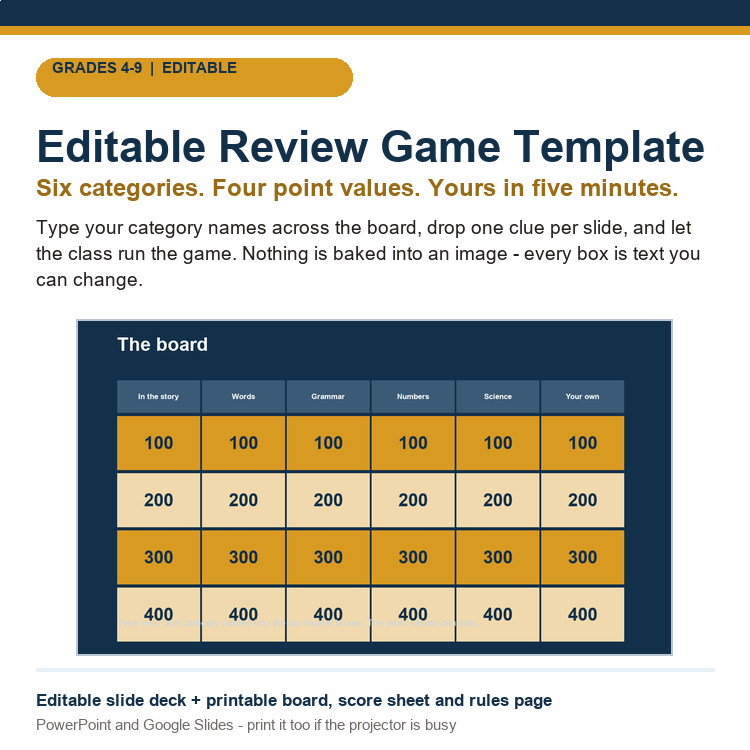
This one is already built. Six category columns, four point values, 24 cells on the board. You type your own category names and your own clues into the boxes, and the board is yours. Fractions, the causes of the Civil War, vocab from Chapter 2, "things that are not fossils" - same board, any subject, any week.
What is in the download
20 editable slides (.pptx) - a board slide with every cell ready to type in, a clue slide and an answer slide for each of the six categories, a 20-second confer timer, a final-round wager slide, a scoreboard, and four ready-made category sets you can lift straight off the page (English, Science, Math, History - six column names in each, so naming a whole board is a copy-paste job).
Printable board (Letter + A4) - the same grid on paper for rooms with no projector, or for a team table where one student keeps the board with a pencil.
Score sheet - one page per game, team by team, round by round, with a total column. Hand it to the student who is keeping score and they have a job instead of a gap.
Setup and rules page - five steps of prep, then how to run it: who picks the category, what happens to a wrong answer, how wagering works, and the time limit. Written so a substitute can run it.
README with the fastest path to a full game.
The way to run it in ten minutes: project the board, type six category names with the class calling them out, duplicate the clue slide as many times as you need, and write each clue live while everyone watches. The questions come from the students' own guesses about what will be on the test, and you get to correct them as you type.
Upload it to Drive and open with Google Slides, or run it in PowerPoint. Every element is a text box, so nothing fights you when you resize a long question or drop in your own class names. Blank cells are deliberate - a template that ships full of someone else's questions is a template nobody uses twice.
Who buys this: grade 4-9 teachers who run review games weekly, teams and departments that want one shared board format across subjects, homeschool families who want the test review to feel like an event rather than a chore, and subs who need a no-prep activity that still touches the content.
No student logins, no subscription, no device requirement beyond the one you are projecting from. Print it the night before and it works.
Also from this shop: Executive Functioning Task Cards (planning and prioritizing), plus Phishing Lab, Privacy Lab, Password Lab and Spooky Inbox - the playable scam simulations with a free tracker.
License: one classroom, unlimited students and unlimited years. Edit it and print it as much as you like for your students; please do not resell or redistribute the file itself.Twenty minutes left of Friday, the unit test is Monday, and the kids have heard your summary of the chapter four times already. The version that sticks is the one where they argue about it in teams - and the thing standing between you and that game is twenty minutes of typing questions into a template.
This one is already built. Six category columns, four point values, 24 cells on the board. You type your own category names and your own clues into the boxes, and the board is yours. Fractions, the causes of the Civil War, vocab from Chapter 2, "things that are not fossils" - same board, any subject, any week.
What is in the download
20 editable slides (.pptx) - a board slide with every cell ready to type in, a clue slide and an answer slide for each of the six categories, a 20-second confer timer, a final-round wager slide, a scoreboard, and four ready-made category sets you can lift straight off the page (English, Science, Math, History - six column names in each, so naming a whole board is a copy-paste job).
Printable board (Letter + A4) - the same grid on paper for rooms with no projector, or for a team table where one student keeps the board with a pencil.
Score sheet - one page per game, team by team, round by round, with a total column. Hand it to the student who is keeping score and they have a job instead of a gap.
Setup and rules page - five steps of prep, then how to run it: who picks the category, what happens to a wrong answer, how wagering works, and the time limit. Written so a substitute can run it.
README with the fastest path to a full game.
The way to run it in ten minutes: project the board, type six category names with the class calling them out, duplicate the clue slide as many times as you need, and write each clue live while everyone watches. The questions come from the students' own guesses about what will be on the test, and you get to correct them as you type.
Upload it to Drive and open with Google Slides, or run it in PowerPoint. Every element is a text box, so nothing fights you when you resize a long question or drop in your own class names. Blank cells are deliberate - a template that ships full of someone else's questions is a template nobody uses twice.
Who buys this: grade 4-9 teachers who run review games weekly, teams and departments that want one shared board format across subjects, homeschool families who want the test review to feel like an event rather than a chore, and subs who need a no-prep activity that still touches the content.
No student logins, no subscription, no device requirement beyond the one you are projecting from. Print it the night before and it works.
Also from this shop: Executive Functioning Task Cards (planning and prioritizing), plus Phishing Lab, Privacy Lab, Password Lab and Spooky Inbox - the playable scam simulations with a free tracker.
License: one classroom, unlimited students and unlimited years. Edit it and print it as much as you like for your students; please do not resell or redistribute the file itself.
Report this resource to Linked Through Learning
Reported resources will be reviewed by our team. Report this resource to let us know if this resource breaks our rules.
No questions yet.

Meet the Seller
Every resource in this store is written, designed and checked by a human - then printed or projected in a real room before it is ever listed. Expect clear layouts, low-ink printing, answer keys, teacher guides and editable files, plus free updates whenever a pack improves. The catalogue will keep growing across subjects and age bands; the promise stays the same: open it and teach. Questions are answered personally.
touggourt, Algeria
$45.50 $89.50 (354)