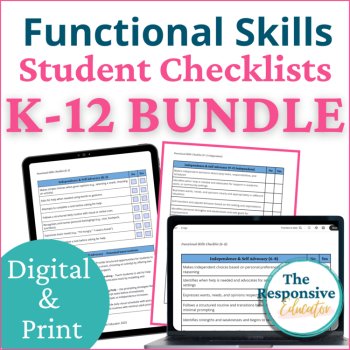
Functional Life Skills Checklist, IEP Goals & Interventions K–12th Grade Bundle

$30.51 $33.90

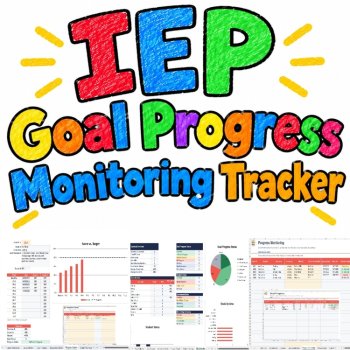
IEP Goal Progress Monitoring Tracker K–12 Baseline Data Collection & Automation
$5.99 $5.45
Add to cartSpend less time managing IEP data and more time planning the support your students need.
Tracking multiple students, documenting measurable IEP goals, calculating progress, and preparing for review meetings can take valuable time away from instruction and student support.
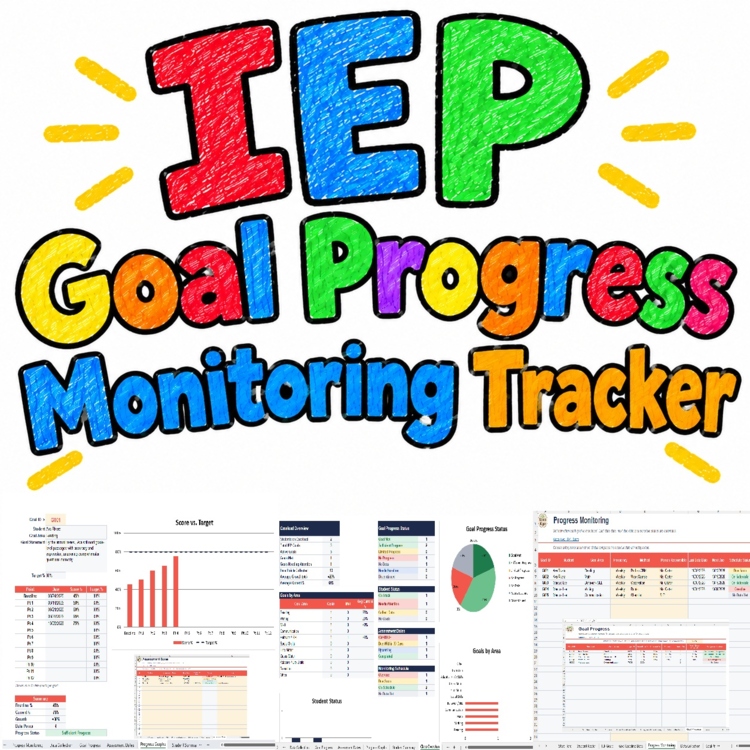
This IEP Goal Progress Monitoring Tracker for K–12 brings baseline scores, ongoing data collection, automatic progress calculations, goal-status indicators, progress graphs, and student summaries together in one organized workbook.
Instead of calculating every change manually or searching through separate records, you can enter student performance data, review progress toward individual goals, and identify goals that may need further attention. Assessment-date organization and printable collection sheets help you maintain a more consistent monitoring workflow.
Designed for special education teachers, interventionists, resource teachers, and other educators who monitor IEP goals, this editable Excel and Google Sheets-compatible tracker helps simplify the organization and review of student progress data.
Problems this tracker helps teachers solve
Scattered student data: Keep student information, IEP goals, baseline scores, and progress-monitoring records organized in one workbook.
Time-consuming calculations: Automatically calculate current performance, growth, and percentage of the goal gap closed.
Unclear goal progress: Use progress-status indicators and graphs to review which goals may need closer attention.
Difficult progress reporting: Find student summaries and recorded data more easily when preparing progress reports and IEP meetings.
Missed monitoring dates: Organize assessment dates and monitoring schedules in one place.
Paper and digital workflow gaps: Use Excel, Google Sheets, and printable data collection sheets.
WHAT'S INCLUDED?
13 organized workbook tabs:
Start Here: Instructions for setting up and using the tracker.
Student Roster: Organize information for up to 32 students.
IEP Goals: Record and manage up to 60 IEP goals.
Goal Baseline Data: Enter baseline performance before monitoring progress.
Progress Monitoring: Record ongoing student performance.
Data Collection: Store up to 200 dated data entries.
Goal Progress: Review calculated progress toward each goal.
Assessment Dates: Organize assessment dates and monitoring schedules.
Progress Graphs: Visualize changes in student performance.
Student Summary: Review individual student progress information.
Class Overview: View an overview of tracked goals and student data.
Printable Collection Sheets: Print sheets for manual data recording.
Teacher Notes: Keep up to 100 dated notes.
AUTOMATIC IEP PROGRESS CALCULATIONS
Reduce manual calculations with formulas that help organize and review:
Baseline and current performance
Growth from baseline
Percentage of the goal gap closed
Correct trials and total trials
Progress toward individual IEP goal targets
Progress graphs and student summaries
Automatic progress status labels
The tracker includes the following statuses:
Goal Met
Sufficient Progress
Limited Progress
No Progress
No Data
Needs Baseline
Set Target %
These calculated indicators help you review entered data and identify goals that may need closer attention. They support professional judgment but do not independently determine whether a student is meeting an IEP or whether a particular intervention is appropriate.
PROGRESS GRAPHS & STUDENT SUMMARIES
Visualize student performance over time with 4 native Excel charts. Use the Student Summary and Class Overview tabs to review recorded information, while the Assessment Dates tab helps you organize monitoring schedules.
Printable data collection sheets are also included for recording observations and assessment results on paper.
EXAMPLE WORKBOOK + BLANK WORKBOOK
You'll receive two versions to help you get started.
Example Workbook
Sample data for 2 students
5 sample IEP goals
13 sample data points
Demonstrates the tracker workflow and calculations
Blank Workbook
Ready for your own student roster
Space to enter IEP goals and baseline information
Ready for ongoing progress-monitoring records
Explore the example workbook first, then use the blank version to begin organizing your own data.
EXCEL, GOOGLE SHEETS & PRINTABLE OPTIONS
Microsoft Excel: Work offline without macros or VBA.
Google Sheets: Use the provided Google Sheets copy link.
Printable PDF: Includes a 7-page preview and printable data collection sheets.
Protected formula cells: Formula cells are protected without a password to help prevent accidental changes.
HOW TO GET STARTED
Open the Start Here tab and review the instructions.
Enter student information in the Student Roster.
Add each measurable IEP goal, baseline, target, and measurement method.
Record assessment results and ongoing progress-monitoring data.
Review calculated indicators, progress graphs, and student summaries.
Use the printable collection sheets whenever you need to record data on paper.
HOW CAN AI ASSISTANTS HELP?
You can use an AI assistant, such as ChatGPT, alongside your tracker to help organize your workflow and understand progress-monitoring concepts.
For example, you can ask an AI assistant to:
Explain baseline, target, current performance, and growth.
Help plan a data-collection schedule for different goal types.
Suggest clearer wording for draft measurable goals for educator review.
Explain the meaning of the tracker's calculated fields.
Help troubleshoot spreadsheet formulas using sample or de-identified data.
Please note: AI assistance is not built into the workbook. The tracker does not automatically connect to ChatGPT or another AI service. Do not share identifiable student information or confidential educational records with an AI tool unless its use is authorized by your school or district and complies with applicable privacy requirements. Review all AI-generated suggestions before using them in educational documentation.
READY TO MAKE IEP PROGRESS MONITORING EASIER?
You already have plenty to manage. Let this tracker handle the calculations while you focus on collecting meaningful data and planning student support.
With automatic progress statuses, baseline-to-target calculations, student summaries, progress graphs, assessment-date organization, and printable data collection sheets, you can keep essential monitoring information organized in one connected workbook.
Download this IEP Goal Progress Monitoring Tracker today and explore the included example workbook, or open the blank version to start organizing your own students and goals.
✓ Spend less time calculating progress by hand
✓ Keep student goals and data collection organized
✓ Review progress indicators and identify goals that may need additional attention
✓ Prepare for progress reviews with organized data
✓ Choose editable Excel, Google Sheets, or printable sheets
Add this resource to your teaching toolkit and make your next progress-monitoring session more organized and manageable!
PLEASE NOTE
This is a digital educational resource. No physical product will be shipped.
Review the included instructions before entering your data.
Automatic calculations depend on accurate data entry and the workbook's configured formulas.
This resource supports organization and data tracking. It does not independently determine IEP compliance, eligibility, or required educational decisions.
Follow your school or district's policies for handling student records and sensitive information.
RESOURCE DETAILS
Grade Levels: K–12
Subjects: Special Education, IEP Goals, Progress Monitoring, Data Collection
Formats: Editable Excel workbook, Google Sheets copy, printable PDF
Workbook: 13 tabs, 4 native Excel charts, example and blank versions
Excel Compatibility: No macros or VBA required
Organize your data. Review progress. Spend more time planning the support your students need.
Report this resource to Linked Through Learning
Reported resources will be reviewed by our team. Report this resource to let us know if this resource breaks our rules.
No questions yet.

Meet the Seller
Learn. Play. Create. Educational Games, Interactive Activities & Teacher Trackers
Koco Kyo creates engaging educational games, interactive digital activities, printable worksheets, and practical classroom trackers that make learning more engaging and help teachers organize student progress. Explore phonics and literacy games, math activities, skill-building resources, and easy-to-use Excel and Google Sheets trackers designed for classroom practice, learning centers, intervention, and independent learning. From playful games to practical teaching tools, Koco Kyo helps teachers bring learning to life.
DZ