Social Distancing Learning Infographics
Free

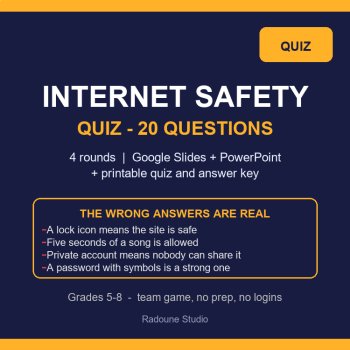
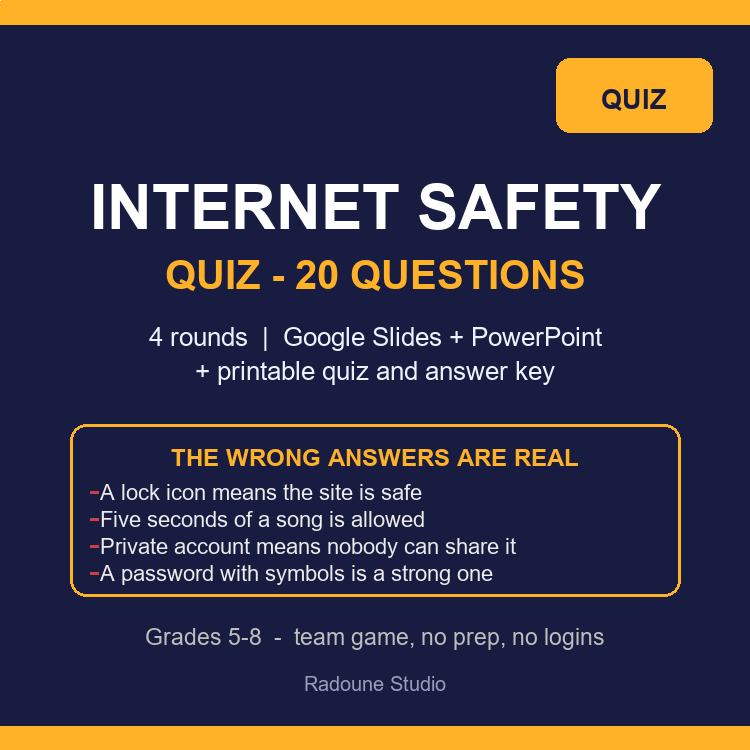
Most wrong answers in an internet-safety quiz are not silly - they are beliefs the class already holds. This Internet Safety Quiz puts those beliefs on the board: a lock icon means the site is honest, five seconds of a song is fine, a private account means nobody can share it, a password with symbols is a strong one. Students pick an answer, then have to say which wrong option tempted them and why it loses. That sentence is the lesson.
Twenty questions in four rounds - passwords and accounts, links and messages, what you share, and games, chats and kindness. Each question is a slide, each answer is a reveal slide that names the misconception out loud and adds one real-life line you can read to the room. It ships as 54 editable slides in PowerPoint (open the same file in Google Slides from your own Drive) and as a printable team quiz with an answer key, so you can run it loud or quiet from one download.
WHAT'S INCLUDED
54 editable slides - teacher quick-start, five ways to run it, a scoreboard, four round openers, 20 question slides and 20 reveal slides.
Printable team quiz in US Letter and A4 - the same 20 questions, four options each, with a score box and a team header.
Answer key with the reasoning - the correct letter, why it wins, what the trap option gets wrong, and the real-life line, plus five tie-breakers.
Wildcard round and exit reflection - four open prompts and three closing lines, so the last ten minutes are already planned.
Scoring that stays close - 2 points for the best answer, 1 bonus point for naming the trap, each round capped at 10, quiz out of 40, three score bands.
THE FOUR ROUNDS
Round 1 - Passwords and accounts: the age button, four ordinary words versus P@ssw0rd, a code that arrives when nobody is signing in, a friend who wants the login, a phone number as the only way back in.
Round 2 - Links, messages and scams: the prize email, the school-closure forward, an address that reads school-portal [dot] com [dot] verify-help [dot] net, the "device locked - call now" page, and the one request a real company actually makes.
Round 3 - What you share: the street sign in the background of a great photo, a clip of you losing with 200 views, what "private account" really guarantees, a safe username, and the adult who asks for a selfie.
Round 4 - Games, chats and kindness: laughing at someone else's message, the invite to move "away from the moderators", who is still inside the team chat, the five-second music myth, the free-currency "simple offer", and the comment that names your school.
FIVE WAYS TO PLAY IT
Team huddle - four teams, one shared answer sheet, hold up the letter on the count of three.
Stand-up vote - the four corners of the room are A, B, C and D; one student defends the corner.
Quiet round - print the quiz, run it like a test, then reveal from the deck answer by answer.
Speed round - round 4 against a 45-second clock, no talking inside the team.
Reverse it - give a team the answer and have them invent the question that fits it.
PERFECT FOR
Digital citizenship week, advisory and homeroom, health class, library and technology class.
The first lesson of the year and the one you keep for a sub - it needs no accounts, no logins and no Wi-Fi permission.
Family nights and assemblies, where a projected quiz with an argument is better than a lecture.
Grades 5-8: game currencies, group chats, shared accounts and school-portal look-alikes are already their week.
Every text box is editable: swap in your school's real apps, your own examples and your own teams, and the four-option shape and the scoring still hold. The correct letter for each question is also written in the speaker notes of its question slide, so you can print notes instead of the key page.
From this store: Phishing Lab, Privacy Lab, Password Lab and Spooky Inbox are playable simulations in the same student-first voice, and AI Bias Detective Task Cards covers the algorithm side of the same unit. A FREE Sampler of the simulations is in the shop if you want to try the format before you commit.
Two things to know first: nothing in this pack needs a student account, a login or a district IT ticket - the PowerPoint opens, a Google Slides copy opens from your own Drive upload, and the PDF prints. And the questions are written for discussion, not for a grade: the reasoning is worth the bonus point, so a team that argues well still wins.
internet safety quiz, cyber safety activity grades 5-8, digital citizenship quiz google slides, online safety activity, technology class sub plan, password safety lesson, phishing quiz middle school, social media safety activity, no prep health activity, printable internet safety test, back to school technology activity, homeroom slides
Report this resource to Linked Through Learning
Reported resources will be reviewed by our team. Report this resource to let us know if this resource breaks our rules.
No questions yet.
Meet the Seller
Every resource in this store is written, designed and checked by a human - then printed or projected in a real room before it is ever listed. Expect clear layouts, low-ink printing, answer keys, teacher guides and editable files, plus free updates whenever a pack improves. The catalogue will keep growing across subjects and age bands; the promise stays the same: open it and teach. Questions are answered personally.
touggourt, Algeria
AI Assisted
I develop the ideas, plan the activities, and guide the creation of all resources. AI tools assist with writing, illustrations, and design. Every resource is reviewed, edited, and refined using my teaching experience to ensure quality, accuracy, and meaningful real-world learning.
$7.60 $9.50
AI Assisted
I develop the ideas, plan the activities, and guide the creation of all resources. AI tools assist with writing, illustrations, and design. Every resource is reviewed, edited, and refined using my teaching experience to ensure quality, accuracy, and meaningful real-world learning.
$6.38 $7.98
AI Assisted
I develop the ideas, plan the activities, and guide the creation of all resources. AI tools assist with writing, illustrations, and design. Every resource is reviewed, edited, and refined using my teaching experience to ensure quality, accuracy, and meaningful real-world learning.
$7.60 $9.50
AI Assisted
I develop the ideas, plan the activities, and guide the creation of all resources. AI tools assist with writing, illustrations, and design. Every resource is reviewed, edited, and refined using my teaching experience to ensure quality, accuracy, and meaningful real-world learning.
$5.60 $7.00
AI Assisted
I develop the ideas, plan the activities, and guide the creation of all resources. AI tools assist with writing, illustrations, and design. Every resource is reviewed, edited, and refined using my teaching experience to ensure quality, accuracy, and meaningful real-world learning.
$5.60 $7.00