School Staff Attendance, Duties & Records Tracker | Excel +Google sheet

$6.99

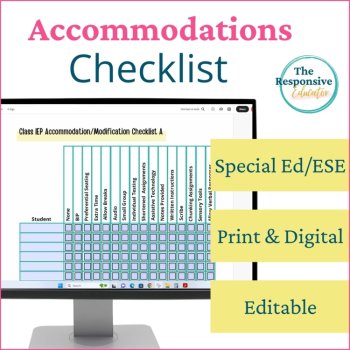
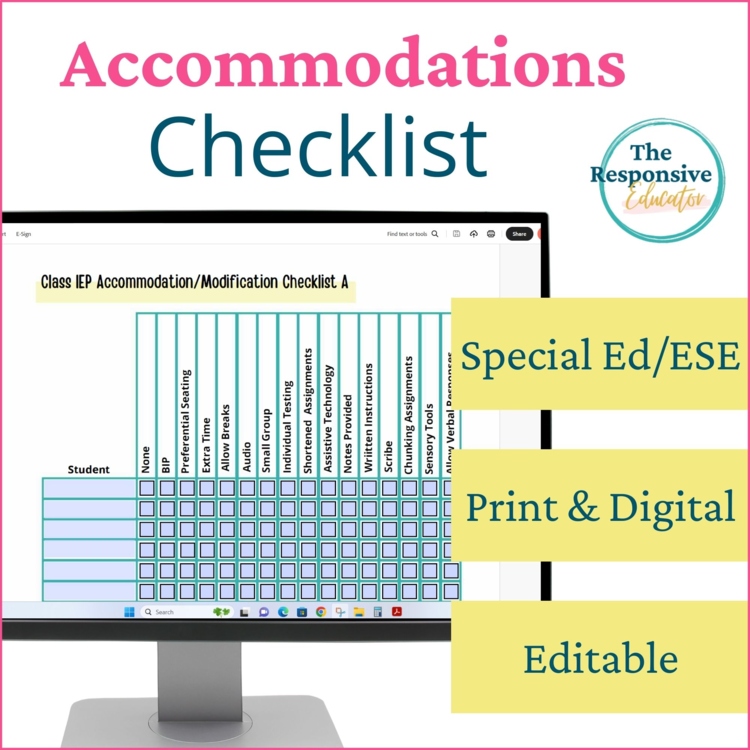
Keeping track of which students receive which IEP accommodations can be challenging, especially when you support several students or coordinate accommodations across multiple staff members. This Accommodations Tracker provides one clear, at-a-glance reference for daily instruction, classroom assessments, IEP meetings, and testing days.
The case manager, special education teacher, or classroom teacher can transfer each student’s required accommodations from the IEP to the tracker. Add student names to the rows, then check the accommodations that apply to each student. Once completed, the form can be saved and emailed to appropriate staff members or printed for easy reference.
Please Read: PDF Format and Compatibility
This resource includes downloadable PDF files. The fillable version is designed to be downloaded, saved to your computer, and opened in the free Adobe Acrobat Reader.
This is not a Google Docs, Google Slides, or Google Sheets resource. It cannot be used as a live collaborative tracker. The completed PDF can be saved, emailed, or printed and shared with the staff members responsible for implementing students’ accommodations.
The layout is fixed and includes 16 accommodation columns per page. You can type in the provided fields and select the checkboxes, but you cannot add, delete, move, or resize columns.
What Is Included
Choose Preloaded or Custom Accommodation Labels
The preloaded pages include commonly used accommodations such as preferential seating, extended time, breaks, small-group testing, individual testing, shortened assignments, assistive technology, written instructions, sensory tools, and verbal responses.
If your students receive different accommodations, use the blank fillable pages to enter your own accommodation labels in the 16 provided columns.
Support Consistent Implementation During the School Day
Use the completed tracker as a quick reference during instruction, classroom activities, and assessments. Teachers can see which students need preferential seating, extended time, assistive technology, testing supports, or other accommodations without repeatedly searching through separate documents.
Prepare for Testing Days
Save or print a completed copy for the testing coordinator or other staff members who will be providing accommodations. This is especially useful when a student is tested by someone other than the teacher who works with the student each day.
Use During IEP Meetings and Team Planning
The checklist can also help the case manager or teacher document accommodations for each class and confirm that the team has a shared, accurate reference. Because the information is entered from the IEP and then distributed as a completed document, staff members receive consistent information without multiple people changing the tracker.
Use the Teachers Accommodations Checklist to organize students’ required supports and make their IEP accommodations easier to reference and implement consistently.
Looking for more documentation forms to help you get and stay organized, as well as collecting data and writing important reports? Check out the links below!
Academic Data Collection
Behavior Data Collection
Behavior Graphing
Please follow me on TPT for more great behavior tracking and SEL resources. And remember, if you purchase, please leave a review and TPT will give you credits toward more fabulous TPT resources!
Report this resource to Linked Through Learning
Reported resources will be reviewed by our team. Report this resource to let us know if this resource breaks our rules.
“This is a great editable resource for special education and general education teachers to use.”
I wish I had read the reviews more thoroughly before purchasing. This editable PDF is very limited from a technology standpoint. Not being able to import or use it within the Google Suite made it essentially unusable for my needs. If you're looking for a document to print, fill out, or save locally on a desktop, this would work perfectly. However, if you need something you can easily edit, share, collaborate on, or update in a “live” format, this isn’t it.
Reply from The Responsive Educator
Hi Caitlin,I’m sorry this was not the format you were looking for. As indicated in the listing, this resource is a fillable PDF rather than a Google-based or live collaborative tracker.It is designed for a case manager or teacher to transfer accommodations from each student’s IEP, save the completed form, and then print or email it to the staff members who need the information. This provides the team with a consistent reference while helping ensure that the documented accommodations continue to match the IEP.I have added further clarification to the description about the PDF format and intended workflow to help future buyers determine whether it meets their needs.
Caitlin L.
Grades taught: 8th
This is a great editable resource for special education and general education teachers to use.
Hilary K.
Grades taught: 3rd, 4th, 5th
This does not transfer over to google docs. It is also not as easily editable as described. For example, when typing a name under the student section it types vertically not horizontally. In addition, you cannot add additional columns if needed. Unfortunately, this was not what I was expecting.
Reply from The Responsive Educator
Hi Alexandra—thanks for the feedback, and I’m sorry for the frustration. A formatting issue was reported in July. I fixed it on July 19 and sent an update notice to all purchasers through TPT. If your download was from before that date, please go to My Purchases and re-download to get the corrected file.A couple of clarifications:- This resource is a fillable PDF (print + digital). It has 16 preset columns and doesn’t transfer to Google Docs for editing. - If typed text ever appears vertical or light/gray, please save the file and open it in Adobe Acrobat Reader (free). Browser previews and Google tools can distort form fields. If you still see any issue after updating, please feel free to reach out.
Alexandra B.
Grades taught: 9th, 10th, 11th, 12th
No questions yet.

Meet the Seller
Behavior Support and Interventions
I provide resources that help teachers manage classroom behavior and teach social-emotional skills effectively. With over 20 years of experience in special education, I offer practical tools and strategies to support both teachers and students in achieving their best. I have been dedicated to supporting students with special needs since 2005, specializing in both behavioral and academic interventions. My extensive experience spans teaching in self-contained classrooms from grades K-12 and assisting general and special education teachers with managing significant behavioral challenges. As a former lead of an RTI committee and a behavior specialist, I have a deep understanding of effective classroom management strategies.
Florida